Network Requirements
-
Every reader deployed needs its own IP address.
-
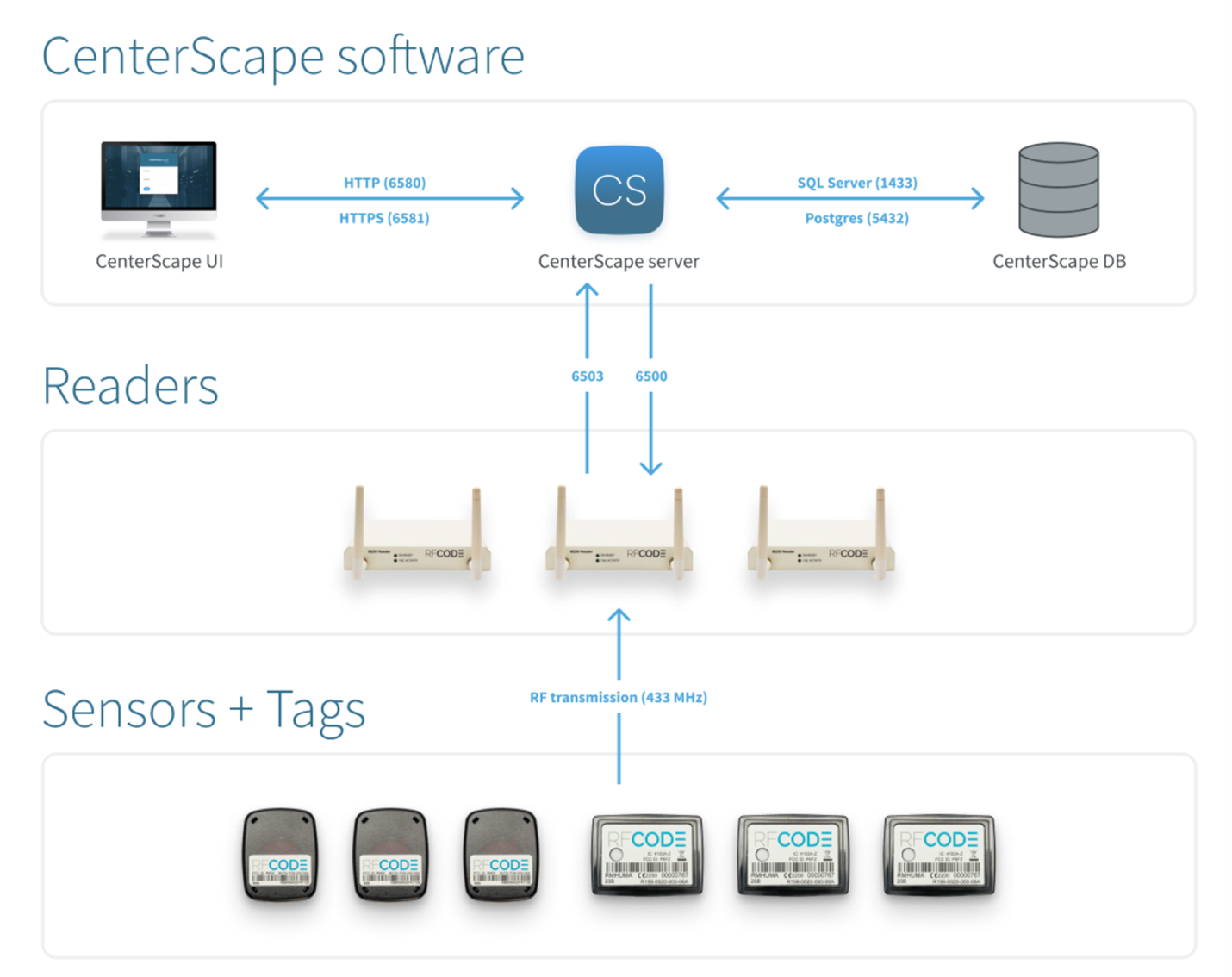
CenterScape needs to be able to reach readers on the appropriate port (default port 6500)
-
*Optionally the readers need to be able to reach the CenterScape server if using the “upconnect” feature which is available but has a higher administrative overhead when using test/dev environments in conjunction with a production CenterScape server. “Up Connect” is generally used when readers are deployed in networks outside the control of the entity administrating CenterScape to prevent the use of complicated VPN tunneling or firewall exceptions to internal networks.
-
For large systems or to reduce latency/bandwidth use over distance a CenterScape Core/Zone Manager servers can be installed separately to handle reader connections. These servers need to be able to connect to readers they are responsible for communicating with on TCP port 6500. Additionally, CenterScape will need to be able to connect to these servers over HTTP/HTTPS which by default is 6580/6581 but can be changed if needed.
-
Web Clients or the users of CenterScape need to be able to access the CenterScape software over HTTP or HTTPS. The default ports are 6580 and 6581 but can be assigned to any port after the install. The web client is how users interacted with the software. Desktop access to the server is only needed for installs or troubleshooting.